



.svg)
.svg)



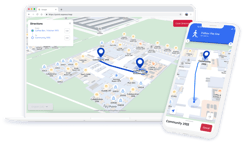



Maps & Wayfinding for Venues & Stadiums - All you Need to Know
Last updated: 13th October, 2026
Key takeaways
- Modern stadiums and event venues need maps and wayfinding to ensure visitors have a best-in-class trip to the venue
- A dedicated indoor map and navigation solution is generally necessary for stadiums due to challenges with GPS-based solutions - namely that GPS has limited functionality indoors
- Fan and attendee experience can be enhanced by maps and wayfinding by improving navigability, accessibility, discoverability of venue points of interest, and unlocking the ability for location-specific promotions and information
- Multiple factors need to be considered when choosing the right technology or system for your stadium, including the accuracy of the location technology, its ability to cope with high load and with limited mobile signals, and the manner in which the solution is delivered
The days of event venues and stadiums being vast, often almost empty, frequently extremely basic spaces and buildings are over. Instead, modern stadiums and venues are expected to provide the comfort, interconnectivity, accessibility, and smart features of the most technologically advanced indoor environments, while also still catering for the huge crowds and enormous capacities required by sports, major events and trade shows, and more.
In this guide, we’ll dive into everything you need to know when it comes to creating a successful mapping and navigation system for stadiums and venues, including the unique challenges that these types of locations pose, the technological and infrastructure considerations required, the use cases for maps and indoor navigation, and more.
Why do stadiums and venues need maps and wayfinding?
As we mentioned in our introduction, stadiums of old were often hulking chunks of concrete - and often not a whole lot more. Nowadays, modern stadiums are feats of engineering, with multiple floors, mezzanine levels, concourses, booths, sky boxes, and much, much more. The same is true for venues, whether they’re used for events, concerts, conferences, trade shows, or all of the above. Whereas these used to be cavernous open spaces, frequently they’re now more complex, with multiple halls, breakout areas, restaurants and other amenities, and much more involved to move around in.
As stadiums and venues have become more complex architecturally, so has the process of visitors understanding the layout and finding their way, particularly as for many of those visitors, their visit may be their first, or could be in an entirely different section than those they’d been in previously.
Not only are these types of locations becoming more complicated to navigate, but they’re doing so at a time when visitor expectations for the ease of navigation are higher than ever. Thanks to the ubiquity of apps like Google Maps and others that leverage GPS, users now expect to be able to access pinpoint, turn-by-turn directions from their current location at the drop of a hat. Modern stadiums may have been designed to enhance the fan experience with more distinct areas, amenities, and more, but the increased challenges of navigating through the stadium without adequate maps or navigation tools may result in the fan experience actually being worse than in a more basic, but easier to navigate, equivalent.
Can stadiums use Google Maps, or an equivalent GPS-based system, for maps & wayfinding?
A question we get often is why large venues and stadiums can’t simply use systems such as Google Maps for their users. The advantages are obvious - many of these apps have high levels of adoption, meaning fewer barriers to getting users onboarded and making use of the system, they’re free to use, and they leverage GPS, meaning no extra hardware is required.
However, for a number of reasons, GPS based systems like Google Maps aren’t always a viable option for stadiums and events:
-
GPS accuracy - While GPS is adequate for many outdoor applications, such as vehicle directions while driving, it can generally only achieve a stable accuracy of around 10 meters, with algorithms and systems applying more educated guesswork to attempt to pin your position down further. (It’s for this reason that when using a GPS-based driving system, if you ever deviate from your route, it can often take several seconds before the system truly ‘realizes’ you’ve left the route, stops showing you progressing on your previous path, and ‘snaps’ your location back to where you are). The problem is that while 10 meter accuracy is often more than adequate when on roads, in indoor environments - even those as big as some stadiums or venues - it can be the difference between two entrances or an entire block of seats, and lead to considerable confusion for users. Furthermore, GPS is even less accurate when it comes to calculating an end device’s vertical position, meaning that for areas with multiple levels, GPS is unlikely to be able to tell users which level they’re on and adjust the map and wayfinding route accordingly.
-
GPS penetration - Perhaps more pertinently, even if GPS could provide the accuracy needed for precise indoor navigation, one key limitation of GPS is its difficulty penetrating any sort of ceiling or overhead structure, particularly those made out of thick materials such as concrete as is often used in stadiums. While GPS may work in open areas, such as the seating area of an open air stadium, inside - where the navigation functionality is likely to be of greater importance - it will at best be even more inaccurate than normal, and at worst fail to work entirely.
-
Limited enrolment and customization options - Many of the major map and navigation apps designed to work outdoors are highly selective about which businesses or locations they enable with any sort of indoor maps. For those that are accepted as eligible for indoor maps, the available options for customization, map details, and wayfinding routes are generally very limited to ensure consistency across the entire map platform.
How can indoor maps and navigation improve the fan experience?
-
Ease of navigation - Naturally, the biggest improvement that maps and wayfinding can give the fan or venue visitor experience is improved ease of navigation through large, often complicated venues. With an optimum deployment, users who previously may have resisted leaving their seat once they’d made their way to it can have the confidence that they can explore all the location has to offer with peace of mind that they’ll be able to find their way back easily.
-
Accessibility - Accessibility plays a huge role in improving the fan experience, by ensuring every visitor can anticipate their trip to the venue knowing that they’ll be able to access clear, detailed instructions to get them exactly where they need to go, accounting for any needs they may have (e.g. avoiding routes that require stairs).
-
Discoverability - Map and wayfinding systems aren’t just great at helping people find what they’re looking for and routing them there; they’re also ideal for helping users to discover all that your stadium or venue has to offer. Via highlighted points of interest (POI) and smart categorization options, maps can offer a great way for users to discover nearby amenities or specific POIs that they’re interested in that they otherwise may have missed, increasing revenue potential for your venue and vendors.
-
Location-based promotions - Similar to the discoverability piece, location-based geofences can be used to alert users to nearby promotions, points of interest, and more. Geofences can be triggered as users move into specific areas, ensuring that the notifications they receive are targeted and promote nearby, convenient map features and offers.
-
Enhanced experience - By integrating maps into your stadium’s app, you give users more reason to use it, to discover more of what your venue has to offer, to unlock special offers, see more about what’s coming up, and more - all of which enhance the overall visitor experience!
Which technology is best to use for stadiums and venues?
There are multiple competing technologies used in order to achieve indoor positioning systems. We’ve covered these extensively elsewhere on the blog (we’ll include links below), but when it comes to stadiums and venues, several specific considerations need to be taken into account when deciding which technology type to build a system upon:
-
Ubiquity of signal type - Some indoor positioning systems rely upon signal types like ultra wideband (UWB) which, while accurate, have a limitation in that only a select number of modern smartphones are UWB enabled. This means that any UWB-based positioning system is likely to only be available to a small number of users. These signal types are usually restricted to ‘closed’ applications, where all users will be using dedicated end devices that have the right signal enablement and applications installed, such as in warehouses, not ‘open’ usage where any member of the public with a smartphone can attempt to use the system.
- Popularity of signal type - Similar to the point above, using a signal type with as little friction as possible is key to user adoption. Many users of modern smartphones, for example, will have their Wi-Fi and Bluetooth turned on at all times, meaning one less step for them to complete when first installing and configuring the app. To learn more about some of the different signal types used in indoor positioning, see the following links:
- Accuracy - Accuracy is, of course, absolutely critical to the efficacy of any indoor positioning system. As discussed in our answer to the question about whether GPS could be used for indoor positioning, accuracy of only 5 meters or more is likely to cause significant issues for users, even when in large open spaces like event halls or stadium concourses. An added challenge for any system’s accuracy when it comes to stadiums or venues is the need to be able to account for often very high ceilings and wide corridors or rooms. As these are typically the places where any sort of positioning hardware is installed, whatever technology is chosen must be able to cope with signals needing to travel some distance, and possibly with some interference along the journey.
- High load - Particularly true of stadiums and venues, any technology needs to be robust enough to withstand significant load; many modern stadiums feature crowds of well over 50,000, all trying to find their seats in the couple of hours before the event begins. Any system needs to be able to cope with such a load. This factors in not only signal type, but also where the system resides. Some positioning systems attempt to receive user location data based on signals received by the hardware, then effectively feed that information back to the user in the form of a blue dot on a map, while others have the end device - likely a smartphone - compute the user’s location based on the signals being received from the hardware. In both cases, load has to be accounted for; in the former, it’s critical that the system is capable of receiving data from 50,000+ users at once and still managing to feed back accurate location data; in the latter, the signals being received by the smartphones need to be strong and consistent enough that all user devices receive enough data to accurately calculate the location.
- Durability - Fingerprinting is a technique used by some indoor positioning companies where a comprehensive set of readings - the building’s “fingerprint” - are taken of the relative signal strengths in different locations. Using these readings, fingerprinting-based systems can in theory find a user’s position without the need for complex ‘live’ calculations that signal-based systems make. However, fingerprinting is highly susceptible to performance degradation over time, meaning systems often have to be completely re-mapped on a regular basis, a costly and time-consuming exercise that outweighs fingerprinting’s benefits.
- Ability to work offline - Stadiums and event venues frequently face issues with online connectivity, in part due to signal penetration issues and the sheer number of people attempting to use mobile networks. Having a system that can continue to provide maps and active wayfinding services even if the user loses signal can be the difference between an experience where frustration outweighs the positives, and an outstanding one.
- Design and style - An inquiry we still get regularly is about the feasibility of augmented reality-style navigation systems, where the user scans their environment via their smartphone camera and is shown directions overlaid on the camera image. While AR navigation and other similar spins on navigation systems offer fun, experiential use cases, they are rarely an adequate substitute for classic style top-down navigation systems when it comes to usability and functionality, not to mention the drawbacks AR systems have when it comes to privacy, safety, and battery drain on users’ smartphones.
Adoption ideas
As we mentioned in our section covering Google Maps, one of the main draws of using a system or app that users are already familiar with and may even have ready to go on their smartphones is the lack of friction for user adoption. A finely tuned indoor mapping and navigation system won’t help any of your visitors if they don’t know it exists, or if accessing it is so cumbersome that they give up before they have a chance to try it out properly. Here’s some top tips that can help enhance adoption for your system:
-
Go where your visitors are - You probably already have a good understanding of your users and their technological habits. Hosting your maps in an environment that your users are already familiar with - be it an app, a kiosk, on a popular webpage, or elsewhere - means you’re not asking them to venture too far from what they know in order to try the system out.
-
Avoid silos - Similarly, avoiding silos by finding a system that can be integrated into your existing information architecture will go a long way to reducing friction. If you already have a stadium or venue app, for example, then the last thing you’ll want is for users to need to download another app in order to make use of your location services.
-
Give multiple access methods - While avoiding silos is critical, so too is enabling multiple access routes for users to find the maps. This can take many forms; for example, if using an in-app deployment, having maps linked to from multiple places (such as from the user’s ticket, so they can request navigation directly to their seat) instead of just via a menu can greatly enhance discoverability. Beyond that, giving users different options to access the maps in the first place - such as via an app, QR code scan, NFC tap, or even via an app-free method like Pointr Express® - can make a dramatic improvement to adoption.
-
Show, don’t tell - While advertising the fact that you have maps and a wayfinding system is better than nothing, if you’re able to show visitors the system in action - whether via in-app demos, video screens of the solution at work, or even kiosks which enable users to interact with the same maps on a large screen - is an extremely effective way of persuading users to put in the time to try the system out fully.
-
Connect use cases - Maps and wayfinding are immensely useful services in their own right, but by connecting use cases to the maps and integrating additional functionality, they can really come into their own, particularly in a stadium context. Enable users to be shown wayfinding directions directly to their seat based on their ticket, order food to their current location, and even share their exact location with friends or family to find one another more easily.
Venue map styles - what works best?
Another frequently asked question is just what mapping system style works best for venues and stadiums. There's no one-size-fits-all correct answer, but based on our years of experience in creating user-friendly maps that can both attract and retain users, here are some of our recommendations when it comes to the style of venue maps you use
-
2D vs 3D maps is not a binary choice - Thanks to the popularity of tools such as Google Maps, a large proportion of modern map users are familiar with the ability to move between isometric, "behind the user" style 3D maps common in driving or directional contexts, and top-down, 2D style maps designed to show the user more of their position within a wider location, aiding discoverability. Many inquiries we receive assume it's a binary choice between one or the other - however, when combined with an intuitive user interface, the best solutions can offer both and enable users to switch between them effortlessly.
-
Augmented reality (AR) is flashy, but often impractical - Augmented reality-based systems sound great in theory, with their ability to gamify the navigation experience and, if implemented well, overlay directions right on top of what the user is actually seeing. However, their style is often lacking in supporting substance. Beyond the technical challenges of implementing an effective system, users need to be looking at the phone screen at all times, limiting discoverability compared to a top-down view of the map. Furthermore, the phone screen and camera need to be on at all times in order for the system to work, draining the smartphone's battery, and the prevalence of cameras in the system can cause issues from both a data protection, and health and safety perspective.
-
Interactive venue maps always beat static - as long as they're implemented well - Interactive maps are now the gold standard for digital venue maps, with most users familiar with them and the gestures needed (such as pinch to zoom in and out). Giving users the ability to interact with the maps is almost always preferable to simply giving them a static map, as it enhances discoverability and enables the user to interact with the map in the way they feel most comfortable. The one exception on interactive beating static, non-interactive maps is if the interactivity isn't well implemented, such as if the level of map detail doesn't respond to the zoom, or if the gestures used to move the map aren't intuitive.
Ready to transform your venue?
Pointr is here to deliver outstanding, accurate, scalable indoor maps and navigation systems for your stadium or venue today. Get in touch or check out our Connected Venue™ partnership program to see how you can transform your location today.


Matt works in Pointr's marketing team, with a long track record of producing content for a variety of publications, including The Next Web. He also works closely with our sales team, meaning that much of the content he produces for the Pointr blog is designed to tackle and answer common questions we receive when working with companies who are in the early stages of investigating how and why indoor mapping and location solutions will benefit them and their customers.