



.svg)
.svg)






The Hospital Mapping & Wayfinding RFP Checklist
As every seasoned procurement team knows, a misaligned RFP or RFI is often little better than no RFP at all. Key information can be overlooked, small details can be focused on minutely, and vendors can be put off by requirements and checklists that hint at a disorganized, confused understanding of what they can and can’t do on a project. Nowhere is this more true than in the complex, multi-faceted world of healthcare RFPs, which can cover a vast range of topics and sectors.
In this guide, we’ll break down the key questions that every healthcare system or hospital should be considering when it comes to issuing an RFP for mapping, wayfinding, or other location-based tools. We’ll review the foundational questions your hospital needs to ask itself about the proposed system. We’ll also explore how these questions should shape and form your RFP, from its overall theme to specific questions. Finally, we’ll cover some common mistakes in hospital RFPs and how to avoid them.
Step 1 - Defining the parameters of your healthcare mapping and navigation RFP
Without doubt, the most critical phase of a successful maps and wayfinding RFP is the first. Defining the precise scope of your project and setting expectations for any responders will ensure you attract the best replies possible, while not putting off any potential vendors by throwing them a curveball that they’re not expecting.
Identify your pain points
Maps and wayfinding systems can help solve a number of pain points in a healthcare context; however, different systems and vendors have differing strengths and weaknesses. Deciding the critical issues that you’re aiming to solve with maps and wayfinding will go a long way to shaping your RFP, and signaling to recipients how well-suited they are.
Common areas that hospitals are often looking to address with maps and wayfinding include:
-
Improving the patient and visitor experience, reducing no-shows or late appointment arrivals, and lowering stress for those arriving in an unfamiliar building
-
Improving staff efficiency, by allowing them to navigate from different areas (including paths through secure areas), see their colleagues’ live locations, and more
-
Facility issues, like giving maintenance staff the ability to report the location of issues, or routing staff between said issues via the most effective path, as well as analyzing building occupancy and usage statistics
-
Better visibility on the location of specific pieces of mobile equipment (such as CT scanners), and thus potentially save money via more efficient usage of said equipment (not to mention less time spent for staff looking for them)
While many of the individual components of the above use cases overlap, there are some critical distinctions that make identifying and prioritizing pain points critical. Solutions and vendors that focus on asset tracking, for example, may use different underlying technology to those who focus on providing indoor wayfinding, where the end device is typically a smartphone. Systems focused on providing value to patients and visitors will likely primarily live within smartphone apps or on large kiosk screens; those intended to aid facility management are generally web-based, and may primarily need to integrate with existing IWMS or building management software.
Thanks to the complementary aspects to all these use cases, there are vendors who may be able to cover all the above use cases, but there is always a risk with a broad remit that you’ll end up with a system that is a jack of all trades, but master of none.
By prioritizing your pain points, you make it clear to vendors what type of solution you’re truly looking for, and in turn encourage those likely to fit the brief the best to respond, while eliminating those who can see early on that their solution is unlikely to be the best in class for your primary use case.
 Define what success looks like
Once you’ve pinpointed exactly which use case or cases are the primary focus for your RFP, the next step is defining what success looks like for your proposed system. For mapping and indoor navigation systems, this could be any of the following:
-
A general improvement in the accessibility and user-friendliness of your hospital.
-
Less staff time given over to situations that can be aided by wayfinding, such as helping lost patients find their way, locating colleagues, or looking for mobile pieces of equipment.
-
More efficient building maintenance, measurable by less downtime for building infrastructure or technology, better use of space, or reduced costs, such as linking HVAC and lighting systems to location data to more effectively reduce wasted energy.
As with determining your pain points, establishing a hierarchy of success measures can help guide potential vendors and help them understand which of your requirements are business-critical, and which are merely “nice to haves”.
What is already in place
Another critical factor to determining the scope of your RFP and the suitability of different responding vendors is making clear what your hospital already has in place. A hospital which has already invested heavily in their own app and kiosk screens will likely favor a flexible solution that can be deployed within their existing ecosystem, not a tool that can only act as a standalone app and requires a separate download by users. A building that is already fully decked out with a certain type of wireless technology - be it BLE, UWB, or something else - will likely want to stick to vendors who can work natively with that technology.
At this point, gathering as many internal stakeholders to fully assess what is and isn’t already in place, or feasible, is a good idea. The last thing you want is to put in a requirement for an app-based solution without checking with your hospital’s IT department whether integrating an external service in the app is possible, or putting off certain vendors by asking them to be responsible for an aspect of the process that has actually been completed in the past by the building management team.
Step 2 - Building your RFP
Now that you’ve defined your pain points, what constitutes success, and what you’ve got in place already, it’s time to start putting your RFP together. While no two RFPs will be the same, here are some broad areas that it’s worth considering, broken down into some of the most common requests that we’ve seen over the years, and questions you should consider when framing your requirements.
Maps
-
Do you need maps, or are you looking to layer wayfinding upon existing maps? Note that in 2026, many indoor navigation and positioning tools can only be used within a singular mapping ecosystem, not layered upon external maps.
-
If you’re starting from scratch, what information do you have available? Most critical is the availability of floor plan files (such as those in a CAD format) and how up to date these are. If these aren’t available, you may need to consider outsourcing their creation to a physical mapping company before they can be digitized, or else find a vendor that can not only produce the digital maps and navigation system, but do so without floor plan files to work with. Equally, if you do have these files ready to use, a tool such as Pointr’s MapScale® engine can leverage AI to enable you to save money and time.
-
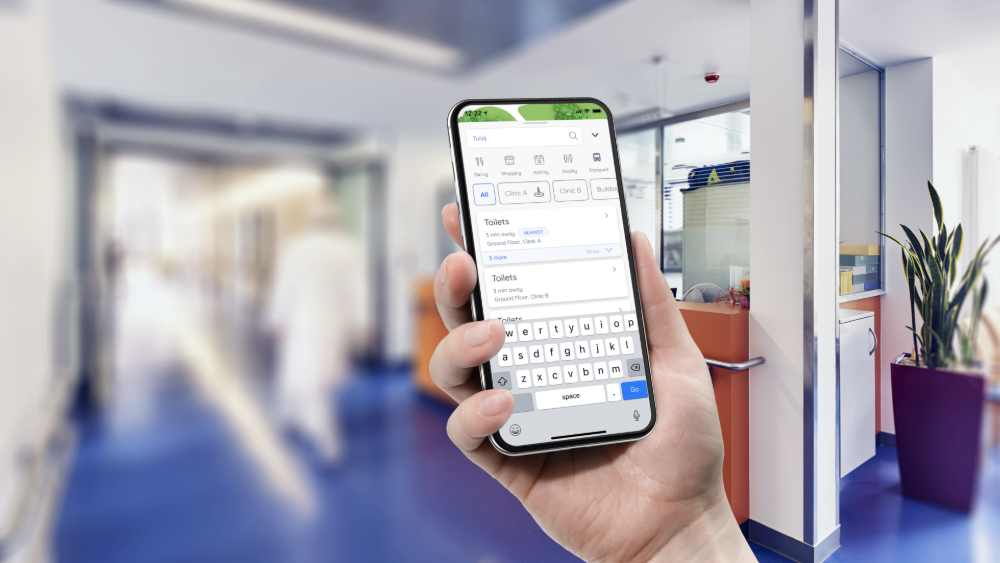
What core features do you need within the maps? Interactivity, zoom options, how points of interest are displayed (and the information that can be appended to them), and so on. Most modern indoor mapping companies showcase multiple demos of their maps on their website to give you an idea of what they can do out of the box.
-
The dimensions and boundaries of the map itself. Something we’re seeing more and more in healthcare is hospitals that need indoor maps, but need them situated on a world map, in order to accommodate users moving between buildings on large campus-style hospitals, to enable them to better understand their starting position when first entering a building, or leveraging extra features, such as wayfinding back to their vehicle. Some mapping vendors accommodate this; others, like those that focus specifically upon asset tracking or integrations with building management platforms, may not.
Wayfinding
-
Does the wayfinding need to be ‘live’, or can it be static? There are two basic types of wayfinding functionality. One is a Google Maps-style system, where you have a blue dot indicating your current location, and which can then enable users to get turn-by-turn directions from exactly where they are to wherever they want to go. Other systems can enable users to select a start and end point and show multiple routing options - but crucially, this style of system lacks the ability to see a user’s live location, meaning less flexibility and no ability to adjust routes if a user deviates from their path.
-
What is the primary functionality of the wayfinding? Wayfinding systems can take a variety of forms, beyond just whether they’re live or static. Some systems leverage smartphone cameras to provide an augmented reality approach. Others take a more classic GPS-style top-down style view, with the map orienting around the user’s position and direction. Others provide turn-by-turn directions (often in conjunction with another view, like a top-down). The right one for your system is likely to depend on who will be using the indoor navigation most often.
-
What accessibility functionality is needed? Patient and visitor-facing systems, designed for use by the public, will likely need the ability to offer users accessibility-friendly wayfinding options, like avoiding stairs or providing voice instructions, in order to ensure that all users have an outstanding experience when using the solution. Some systems, such as those designed specifically for building management or maintenance systems, are less likely to support such functionality out of the box.
-
Who will be using the system? The users - and primary use case - of the system may govern what technological base the system can be built upon. If the wayfinding will be primarily used by hospital patients and visitors via their smartphones (whether in an app or via an app-less solution such as Pointr Express®), then enabling its usage via a commonly available technology - such as Bluetooth - is critical for efficacy. If the system is intended more as a ‘closed’ environment, specifically for asset tracking, or staff usage where staff will be provided with end devices, then different signal types could be used.
-
Can the system cater for multiple user types? If the system is intended to be used by multiple different personas, can it cater for that by showing different versions of the maps and alternative wayfinding routes depending on the user’s type (i.e. a staff user having access to restricted areas that a patient user would not be able to navigate through)?
-
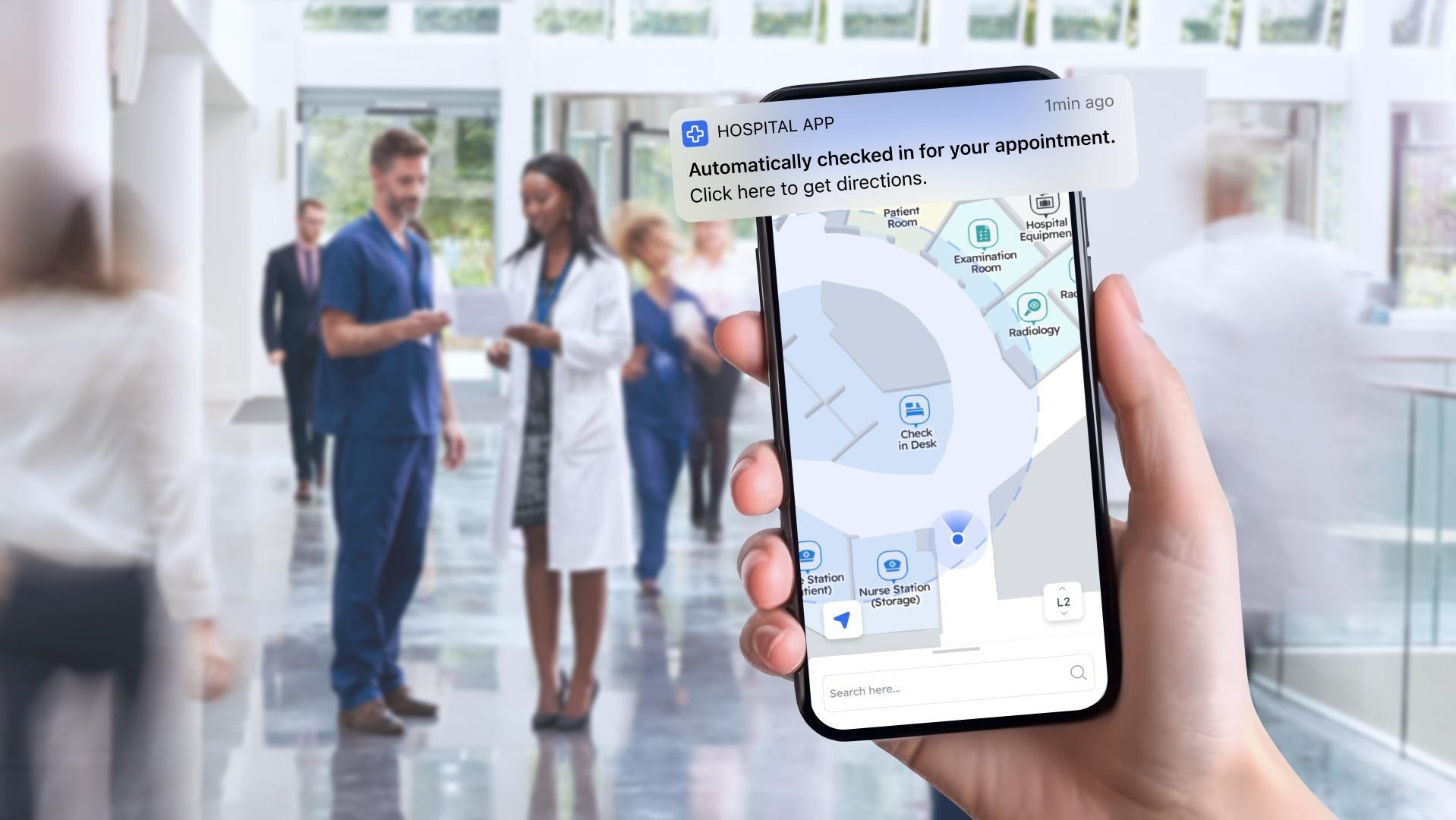
Is straightforward "A to B" wayfinding enough, or does the system need to work for multiple "Campus" style use cases? Achieving an accurate, scalable, affordable ‘Indoor GPS’ style blue dot in hospitals has been, for years, such a challenge that most systems never looked beyond the walls of the building. However, many modern healthcare facilities consist of multiple buildings in a campus style, with patients, visitors, and staff often needing to move between them, or move from a vast parking lot to a certain building. While providing accurate wayfinding when inside the buildings remains paramount for many systems, the ability to connect the indoor navigation experience between multiple buildings is often just as important; achieving this requires a system that can cope with multiple signal types (often GPS when outdoors and whatever signal is used for indoor location), and can intelligently transition between them when needed. The same is true for systems needing to account for floor levels, which in healthcare is the majority; some signal types can’t account for verticality. See the image below for an example of what a modern patient navigation journey can look like on a single visit to a hospital.
.png?width=1756&height=784&name=image%20(4).png)
Analytics
-
What data do you need? Different solution types will cater to different types - and depths - of analytical data. For example, are you wanting to understand how visitors and patients are using your hospital and pinpoint any particularly difficult to navigate areas, or are you needing a more in-depth analytical look at exactly where your facility could be saving money by better optimization of the HVAC, lighting, and energy systems?
-
How pivotal is data to the entire operation of the system? For some healthcare systems looking to implement maps and wayfinding, the data they can gather from such systems may be absolutely critical to ensuring operational improvements and greater efficiencies. For others, the data may merely be a “nice to have,” with the operational functionality of the system and its impact upon end users of far greater importance.
-
What data protection provisions are in place? For any type of indoor location or mapping deployment, data protection is paramount, but nowhere more so than in a healthcare context, where the maps and wayfinding system may be integrating platforms that contain highly sensitive personal information, such as users’ medical records.
.png?width=1920&height=1080&name=employee%20flows%2c%20congestion%20data%20to%20improve%20hospital%20operations%20(1).png)
Flexibility, adaptability, and integrations
-
What surfaces do your maps need to appear on? Hospital maps tend to appear on a combination of apps, the web, kiosks, and within other applications (like building maintenance dashboards). Consider where your desired system will live, what you already have in place, and what you may need to put in place beforehand. Some mapping and wayfinding companies will provide an app for you, whereas some will have an SDK designed to integrate into a pre-existing app. Some will be designed specifically for a single surface, like kiosks, and provide the hardware accordingly; others will be more focused on the software and making it agnostic to any surface.
- Do you have an existing healthcare app, either independent or via a popular EHR like Epic MyChart? In-app experiences remain the gold standard for most mapping and location services, due to the functionality of smartphones, the signals they can work with, and the permissions that apps can request (which many web-based applications cannot). However, for healthcare networks that already have an app, either one they've built themselves or one based on an EHR system such as Epic MyChart, adding another app for users to download is never an ideal solution. Finding a maps and wayfinding tool that can integrate into what you've already established matters immensely.
- Do you need an app? Quite often, we hear from hospitals who want a fully-fledged "indoor GPS" style system, but that don't have any sort of app at all. As mentioned in our last points, whilst map and "static" wayfinding systems, where a user picks their start and end point and then are shown a route, can work across a host of surfaces, systems that can replicate the sort of outdoor functionality users are familiar with thanks to tools like Google Maps tend to need to be an app. If you want to provide the full wayfinding experience, it's worth understanding if the vendors you're speaking to have an app option (or an app-free option, like our Pointr Express® solution), or if you'll need to look elsewhere in order to develop an app first.
-
What integrations do you need? Integrations are vital for a number of critical healthcare mapping use cases. Everything from the ability to guide patients directly to their next appointment the moment they step inside the hospital through to seeing facility maintenance issues displayed dynamically upon the map will rely on an integration at some stage; the question is, which integrations do you need? Is there a single map and wayfinding tool that supports the end-to-end use case you’re looking for, or will you need to combine multiple tools together via the maps in order to achieve your desired use case?
- Can the system leverage agentic AI, or chatbots? Consumer expectations for the ubiquity and effectiveness of chatbots, particularly AI-powered ones, is increasing rapidly, and more and more healthcare apps are looking to offer chatbots as a way of rapidly surfacing important information and helping patients find what they're looking for. Given this rise in expectations, one future-proofing consideration for healthcare systems with both maps and wayfinding, and chatbot functionality, is how the two can interact; can the patient speak to the chatbot about their next appointment, and then be given a direct link to begin navigating on the map? Can they ask the bot for the nearest refreshment amenities to a certain location?
-
What sort of control do you need over the maps themselves? How quickly may you need to edit/ update them? For facility-facing maps, it may be the case that they’ll very rarely need updating. However, for patient- or visitor-facing maps, regular updates may be required, such as blocking off corridors or entrances that are temporarily unavailable for wayfinding purposes. For such cases, selecting a vendor that provides an editable CMS and training for how to use it would be preferable over a slower, less flexible system that requires the vendor’s involvement.
-
Can the map’s styling be branded/ adjusted? Some vendors support maps that can be edited to match the hospital’s brand colors, logos, font, and more; others have a more static approach that is less adaptable.
-
Is there any support for panic button or emergency alert modes? One popular request for healthcare systems specifically is the ability to enable panic button or emergency alert modes. These can serve a range of functions, from letting staff quickly alert colleagues to their need for assistance at their location, through to helping safely guide patients and visitors to emergency exits in the event of a fire.
.png?width=1000&height=563&name=Untitled%20(1).png)
Step 3 - Adding in technical specifications and standard RFP areas
Now that you’ve got the fundamentals of your system requirements scoped out, it’s time to add in some additional technical questions that are always useful to ask when it comes to mapping and wayfinding systems, plus some standard areas RFPs tend to cover.
-
How accurate is the indoor positioning? Any indoor location system requires accuracy, but the degree to which a vendor is willing to commit to a certain accuracy is indicative of how effective that system is likely to be, particularly if it’s patient- or visitor-facing, where user experience is paramount. Any system that can’t guarantee accuracy of 5 meters or less is unlikely to work effectively in a complex indoor environment where users are expecting a blue dot to guide them, turn-by-turn.
-
Does the navigation system rely upon technology or techniques which could result in degrading performance over time? Different methods for achieving indoor positioning where GPS cannot reach exist. While almost all require some degree of initial calibration, the longevity of different systems before they require re-calibration can range enormously - some systems may never require re-setting, while others, such as some of those based on fingerprinting methods, may see a significant degradation in the quality of results in a matter of months.
-
What signal types are used? Different vendors are likely to favour different signal types - it may be that their system only works with one type, or they may simply favor a certain signal. If you have any hardware installed already, picking a system that can leverage what you have in place already is an ideal cost-saving measure.
-
Is the system scalable? Many healthcare deployments start (relatively) small and then expand - it could be a single building, with a view of rolling out to an entire hospital, or a single hospital, with the potential to roll out to multiple locations. In either scenario, finding a vendor that is capable (logistically and technologically) of meeting the full potential roll-out is critical.
-
Is hardware required? And if so, what does the installation process look like? Some vendors claim to be able to deliver accurate indoor positioning and location systems without the aid of additional hardware; understanding what the vendor proposes to do in terms of a hardware-free or hardware-based system is an important step. We have a guide to hardware-free solutions available here.
-
What APIs and SDKs are available? Understanding each vendor’s API and SDK accessibility will go a long way to telling you how flexible their system is.
-
What languages are supported? Hospital have known for years how important clear, concise signage is due to the number of non-native speakers likely to be moving through the building. Interactive maps and wayfinding systems have many benefits over traditional signage, but many of those benefits will be squandered if the system doesn’t support a range of common languages spoken in the hospital’s location.
- What is the data privacy structure? Naturally, when working with highly sensitive materials like users' medical records, privacy is of huge importance. Understanding which security protocols and frameworks that a solution adheres to, and the exact nature of how it handles data (such as, if installed in app, does it need access to the health records of users, or is it completely siloed with no ability to access the sensitive data?) is vital
-
Is it possible to deep link to destinations on the map? While on-map information is critical to a successful interactive map, the ability to link other areas of an app to a particular point on the map, ideally with the option to begin routing straight away, is the gold standard of inter-app operability.
-
What does the typical deployment timeline look like? Systems as potentially complex as indoor positioning solutions can come with a complex roadmap in order to fully launch; understanding those timeframes can be extremely helpful, and may help determine which vendors you have available if working to a limited timeframe.
-
What resources are needed from the hospital team? This is a fairly standard addition to any RFP, but can be particularly important when it comes to map creation; if you don’t already have some architectural floor plans, historic maps, or some other form of map on file, it can be difficult for many modern indoor mapping and navigation vendors to work with, as they may require the hospital to be physically mapped out first. Learn how Pointr’s MapScale® solution is capable of taking architectural CAD files and transforming them into wayfinding-enabled maps in seconds by clicking here, and try out a live demo if you have CAD files available by clicking here.
-
What support is included? Even the best-designed system can have unexpected flaws and downtime; locking in support options at RFP stage, in terms that suit your hospital, is critical.
-
How is the pricing structured? Some maps-only providers offer a one-time map creation fee option, while others charge a license for ongoing maintenance. For maps and wayfinding, the majority of vendors charge a license cost.
Matt works in Pointr's marketing team, with a long track record of producing content for a variety of publications, including The Next Web. He also works closely with our sales team, meaning that much of the content he produces for the Pointr blog is designed to tackle and answer common questions we receive when working with companies who are in the early stages of investigating how and why indoor mapping and location solutions will benefit them and their customers.