



.svg)





An Inside Look at Pointr Maps™ v9.3 Update
Were you unable to join Pointr’s v9.3 Product Demo on December 12th? No worries, here is your inside look at what you missed.
The v9.3 product demo showcased some exciting updates, specifically Step-by-Step Wayfinding for Mobile, Hybrid Wayfinding for Mobile, and a Refreshed Analytics Dashboard. These updates serve to provide a reliable wayfinding and concise data for users.
Step-by-Step Wayfinding for Mobile
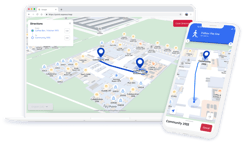
Step-by-step wayfinding, previously available on our Web SDK, is now supported on Mobile as well. It acts as a reliable fallback when live location isn’t available, allowing users to still have access to step-by-step directions. They simply type in their starting point and their desired destination to receive clear, easy to follow step-by-step directions, even without a blue dot.
Why it matters
This feature works both as a planning tool and a fallback when live location isn’t available or location permissions aren’t enabled. Despite there being no blue dot, users can rely on Pointr Maps to still provide accurate and precise directions to wherever their destination is.
Hybrid Wayfinding
Adjacent to the step-by-step directions on mobile, the hybrid wayfinding feature provides users with the ability to switch from step-by-step directions to live directions with Blue Dot once it becomes available. It is designed for large, multi-level venues where Bluetooth coverage may only be available in certain areas, such as convention centers or exhibition venues.
Why it matters
When Bluetooth isn’t available, location often falls back to GPS, which can be inaccurate indoors and can’t determine floor level. Hybrid Wayfinding avoids unreliable wayfinding experience by switching to step-by-step directions and returning to live blue-dot directions as soon as accurate signals are available.
Case Study
While the entire venue is mapped — including connected casino and hotel areas — Pointr Indoor Positioning is only deployed inside the exhibition halls.
The journey begins in an area where Bluetooth coverage isn’t available, and location relies on GPS, which is unreliable indoors. Hybrid Wayfinding ensures the wayfinding experience remains accurate throughout the journey by adapting to the available signals.
- GPS is used initially, but provides inaccurate indoor positioning, showing Ege outside the building.
- The system detects that he is outside indoor positioning coverage and switches to Hybrid Wayfinding, prompting him to manually select a starting point.
- Step-by-step directions guide him to his destination (Starbucks).
- When indoor positioning becomes available, the system notifies him and seamlessly switches to live blue-dot wayfinding.
- Directions remain accurate and consistent from start to finish.
This example shows how Hybrid Wayfinding maintains a consistent wayfinding experience, even as location signals change.
Refreshed Analytics Dashboard
The final product update is the refreshed Analytics dashboard. Rather than adding more data, the focus was on making existing data easier to understand. The dashboard now features a cleaner layout with fewer charts, so key metrics stand out at a glance. Session count and session duration are shown together to better reflect user engagement, user ratings are surfaced directly on the dashboard, and application filtering clearly separates usage across Pointr Express v8, v9, App Clips, and Web. Additional details are available through hover tooltips, providing more context without cluttering the view.
Why it matters
These improvements make it faster and easier to analyze usage and user feedback. With clearer metrics, inline tooltips, and better filtering, teams can quickly gain an accurate and trustworthy view of real user behavior with less effort.
Catch the full product demo
in just 17 minutes

Gina works in the Pointr marketing team assisting with ABM, blog posts, customer slide decks and attending local conferences. She recently graduated from Bucknell University.